GPS Bike Computer vs Smartphone App: Which Wins for Tracking?
You’ll get more reliable tracking from a GPS bike computer on long rides: it logs sensors continuously, runs GPS navigation for 20–30+ hours, stores maps offline, and produces cleaner Strava files.
Your smartphone costs less and offers a larger, touch-friendly map, making it practical for short commutes, but navigation commonly lasts only 4–6 hours and background controls can disrupt tracks.
Both pair heart-rate and power sensors.
The details below clarify which setup fits you best.
Offline Maps and SOS
For offline navigation, a dedicated GPS bike computer usually delivers the more dependable long-ride setup: it stores cycling maps and routing data locally, redraws routes efficiently, and commonly runs GPS plus navigation for 20–30+ hours. That lets you navigate through dead zones during network outages without relying on app connectivity or a power bank.
| Criterion | What you get |
|---|---|
| Offline endurance | Computer: 20–30+ hours; phone: typically 4–6. |
| Rerouting | Local vector maps reduce lag; phone performance varies. |
| SOS path | Phone-native alerts usually need cellular service. |
| Independent rescue | Requires a satellite communicator. |
Phones offer crash detection, manual Emergency SOS, and location sharing. Yet alerts need cellular service.
Most computers relay alerts through your paired phone; independent SOS requires an inReach or SPOT-type communicator. Download maps before departure and plan redundancy.
Mounting and Screen Interaction
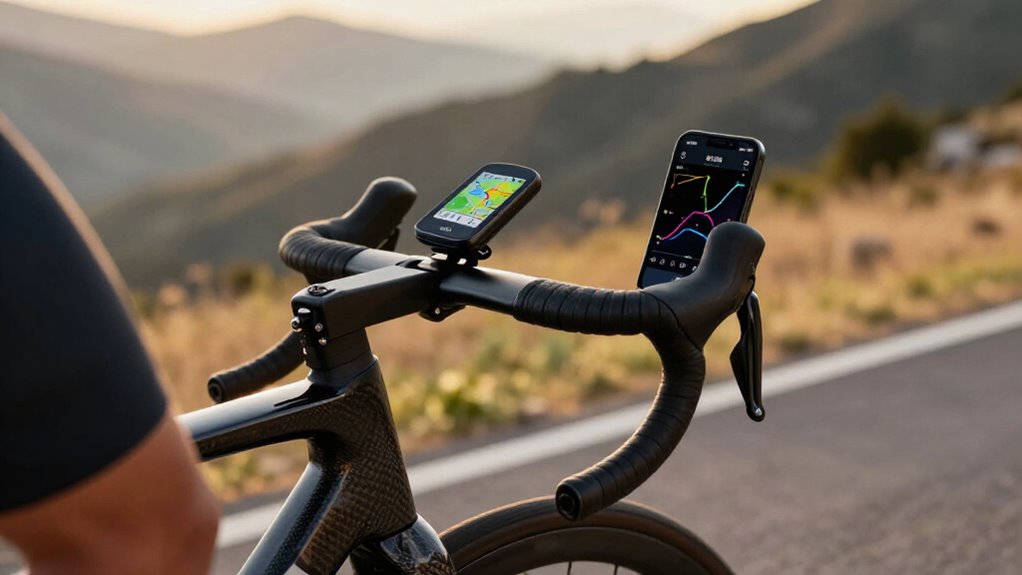
Once maps and emergency coverage are sorted, mounting and screen interaction shape how safely you can use either device in motion. Bike computers favor a low, purpose-built bar position and glance-down interaction; phone mounts demand more setup, even when vibration-damping designs such as SP Connect’s Handlebar Mount Pro MTB improve stability.
- Phone screens give you more touch-friendly area for panning, zooming, and identifying stops or route features accurately.
- Computer mounts install cleaner and keep controls closer to your natural sightline.
- Glare, bumps, and hand position can obstruct a higher-mounted phone more often.
- Compact stem setups save space, but smaller computer displays compromise detailed map reading; Edge 1050-sized units narrow that gap.
For ultra-distance backup, you can carry a phone, but it isn’t ideal continuously.
Heart-Rate and Power Sensor Data
With heart-rate and power data, both a smartphone and a GPS bike computer can record the same paired sensors, but the head unit usually delivers the more dependable training file. Reading accuracy still originates chiefly in your chest strap or power meter, plus Bluetooth or ANT+ link quality. Yet dedicated computers pair with practically any cycling smart device through a focused sensor stack, minimizing app-layer conflicts and connection dropouts.
They also log speed, elevation, cadence, heart rate, and watts continuously in one cycling-specific workflow. Your phone can produce comparable averages, peaks, and interval files on short rides, but active GNSS and sensor streaming consume more battery. On longer adventure rides, you may need an approximately 15,000 mAh battery pack to prevent a logging gap.
Setup Time for New Riders
Although a smartphone seems like the quickest entry point, a new rider must usually install and configure an app, buy a secure handlebar mount, and download maps or pay for features before the first ride. Compare your options:
- A Garmin Edge 530 records cycling data out of the box.
- Komoot requires route loading before you start.
- Uploading tracks to a bike computer takes minutes, then supports hands-free riding.
- Phone navigation demands map management and, on long rides, potentially a 15,000 mAh battery pack.
Your phone lets you pan, zoom, and inspect Komoot elevation details quickly when routes change, but it still adds a loading step.
The dedicated unit’s track-transfer workflow is slower than phone planning, yet it reduces pre-ride variables and avoids charging constraints.
iPhone–Android Platform Support
Platform choice matters more for the phone-app experience than for core ride recording: Komoot and offline-map tools work on both iPhone and Android, but GNSS behavior, background-app management, and battery drain vary by handset and operating system.
On either platform, you can plan routes, download regions for offline navigation, and record tracks through the same cycling apps. The difference is operational: iOS and Android apply distinct location permissions, background-execution rules, and power-management policies. Those controls can determine whether your app maintains continuous logging after the screen locks or another app interrupts. Results also vary by phone model, since GNSS hardware and antenna implementation aren’t standardized.
A dedicated bike computer bypasses those platform-specific variables: its built-in GPS records independently of phone software. Uploads remain device-agnostic.
Battery Replacement and Subscription Fees
Smartphone navigation shifts battery cost from the device to the ride setup: sustained GPS and screen use often requires a roughly 15,000 mAh power bank plus café charging on longer days. You’re not replacing a phone battery directly; you’re adding capacity, weight, cables, and charging stops.
Compare the recurring burden:
- Phone rig: roughly 15,000 mAh external capacity for endurance.
- Bike computer: about two days per charge.
- Garmin solar models: up to around five days.
- Komoot: $2.99 monthly; maps.me offline maps: free.
If you choose paid navigation and a power bank, your phone system can approach the $299.99 Garmin Edge 530 benchmark. A dedicated unit instead concentrates cost upfront and needs periodic charging, not a navigation subscription.
Touring benefits: runtime; free offline maps keep occasional rides competitive.
Crash Detection Reliability Limits
Crash detection can’t guarantee an alert after every impact: it depends on the device retaining power, a stable GNSS fix, and a usable connection through the event. Dedicated head units usually offer the stronger failure profile because weatherproof housings and secure, purpose-built mounts better resist dirt, vibration, and dislodgement. A phone can still run detection, but a cracked screen, shifted mount, pocket placement, or depleted battery can interrupt location sampling or prevent post-crash use.
This matters on long rides: GPS-active phones often need external power, while cycling computers are engineered for extended continuous operation. Neither device eliminates single-point failure. For higher resilience, carry both: let the head unit provide primary tracking and navigation while your phone remains a backup if the computer is damaged.
Strava Segment Support Compared
For live Strava segments, a bike computer gives you hands-free start alerts, progress data, and stable GPS logging, while a phone relies more heavily on an active app, permissions, and battery.
You’ll usually get more consistent segment timing from a dedicated unit’s cycling-focused GPS and sensor integration. After the ride, both upload to Strava for segment analysis, but the computer’s cleaner elevation and sensor data can make your results more reliable.
Live Segment Features
Although both setups can deliver Strava live segments, a smartphone often feels more seamless because its app can combine continuous GPS tracking, live data connectivity, and richer on-screen segment context. You’ll see prompts and progress without switching devices, provided coverage holds.
- Phones prioritize context, but GPS, cellular data, and an illuminated display accelerate drain.
- Dedicated computers trade richer visuals for lower-power, sustained recording.
- On all-day routes, their endurance preserves alerts longer without external power.
- With a phone, carry a 15,000 mAh pack or limit screen use.
That difference matters when you’re chasing repeated live efforts: uninterrupted alerts depend on available energy, not only app capability. For short, connected rides, your phone delivers context; for endurance events, a bike computer is the safer live-display platform.
Post-Ride Segment Analysis
Post-ride, a dedicated GPS bike computer usually delivers more dependable Strava segment analysis because it records continuous, cycling-specific data for the entire activity. A Garmin Edge 530 logs track data directly, then uploads a complete file for Strava to match against segment start and finish boundaries. Its consistent GPS speed, distance, and elevation inputs, supplemented by wheel, cadence, or power sensors, reduce ambiguous timing and distance breaks.
Your phone can display live segments, but battery-saving controls, background restrictions, and variable signal quality may thin or interrupt the recorded track. That weakens post-ride attribution, particularly on long routes containing repeated or closely spaced segments. For meaningful comparisons, record every effort through one repeatable workflow, such as Edge-to-Strava, rather than switching phone apps or charging setups.
Commuting Versus Race-Day Needs
For a short daily commute, your smartphone delivers GPS logging and flexible turn-by-turn routing without the roughly $300 upfront cost of a Garmin Edge 530. On race day, you’ll benefit from a bike computer’s 20+ hour runtime, stable sensor connections, and glanceable navigation when consistent data matters.
Choose the phone for low-cost convenience and quick route changes, or choose a dedicated unit when endurance, weather resistance, and reliable performance set the priority.
Daily Commute Priorities
Daily commuting shifts the GPS bike computer-versus-smartphone calculation: most short rides won’t drain a phone enough to require the 20-plus-hour endurance of a dedicated unit. For a typical commute, tracking and navigation stay within a phone’s practical battery window, while a cycling computer conserves power more efficiently during simultaneous mapping and recording.
- Choose your existing phone when upfront cost and detailed rerouting matter most.
- Budget $30 for a power pack and $69.95 for a secure mount.
- Expect weather and impact resistance from a purpose-built head unit.
- Use glanceable turn prompts to keep hands on the bars.
An Edge 530-class device costs about $299.99, so compare total setup cost, exposure to rain, and your need to protect your phone before buying for every daily trip.
Race-Day Performance Demands
Race day changes the device calculus: a smartphone that handles a short commute can constrain navigation and tracking when GPS, screen, and mapping run continuously, often requiring a 15,000 mAh battery pack after roughly an hour of full-use navigation.
For competitive events, you need uninterrupted, repeatable files, not a phone that diverts power from recording to its display and apps. A cycling head unit typically claims 20-plus hours, so you can log the whole course without recharge stops or cable management.
Its mounted, glanceable display shows turns and waypoints at tight junctions; phone interaction and insecure mounts cost attention. Weatherproof, crash-resistant head units also preserve usability in rain and mud. You can upload a course quickly through Garmin, Wahoo, or Hammerhead workflows before starting.
Choosing the Right Tracker
Your ride profile should determine the tracker: on short commutes, a smartphone running Komoot or offline maps can deliver turn-by-turn navigation at low cost, and its typical roughly three-hour practical navigation window rarely creates a constraint. For racing, long loops, or structured training, choose a dedicated computer: it preserves your phone, logs continuously, and better tolerates rain, vibration, and crashes.
- Commute: A Komoot subscription costs about $2.99 monthly; offline maps avoid coverage-dependent routing consistently.
- Endurance: Computers run up to roughly two days; solar versions can approach five, eliminating daily charging needs.
- Reliability: Weatherproof housings and secure mounts reduce failure risk when rain, impacts, and rough roads compound.
- Hybrid: Mount your phone as backup navigation while the computer manages core recording and battery-critical race data.
Choose by Route Length
Route length quickly separates a smartphone app from a dedicated bike computer: for rides of roughly three hours, a phone can be practical, but GPS tracking, screen use, and navigation can drain it far sooner without aggressive power management.
For short rides, you can conserve power by dimming the display, downloading maps, and closing background apps. Yet phone GPS can demand serious power management after about an hour, whereas dedicated units commonly log more than 20 hours. Choose a head unit when your route exceeds three hours or you need minimal recharge stops.
A 15,000 mAh pack can extend phone runtime, but adds weight and cable management. For remote multi-day routes, including a 360 km High Atlas circuit, its battery headroom keeps logging reliable.
Conclusion
You’ll get the best results by matching hardware to route risk and training goals. A GPS bike computer delivers offline mapping, glove-friendly controls, longer battery life, and steadier ANT+/BLE sensor logging, so it wins for long rides, racing, and remote roads.
Your smartphone app costs less, starts faster, and handles messaging and flexible navigation well, so it suits short commutes. Don’t treat crash detection as guaranteed: carry identification, enable alerts, and plan a backup option.